EvoNet-Industry-4-0-Interface - v2.0.1

Documentation /
v1.0.0.7 /
15.03.2023 /
15:26
Info
The EvoNet Industry 4.0 Interface is started automatically when the machine computer is started. This start is independent of the EvoNet software.
How to get a client list?
First of all, it must be ensured that the querying computer is in the same IP area as the EvoNet Industry 4.0 Interface Server. In this case it would be the machine computer.
Execute a query in the following format via the RestAPI:
http://*IP.ADRESS.OF.MACHINECOMPUTER*:3333/clients
Here is an example:
http://192.168.3.189:3333/clients
With the help of this JSON data array you can read out the id of the desired client.
Here is an example:
[
    {
        "Id": "4C4C4544-004C-3010-8035-C6C04F475132",
        "Maschinennummer": "9999",
        "Standortinfo": "DELL-OPTIPLEX-1",
        "MaschinenModel": {
            "evoNetEnumValue": 1,
            "evoNetEnumText": "_EVO_BINGO2",
            "maschinenTyp": "EVO BINGO 2",
            "image": "data:image/png;base64,..."
        }
    }
]
how to get the data of a specific client by the client-id?
Execute a query in the following format via the RestAPI:
http://*IP.ADRESS.OF.MACHINECOMPUTER:3333/materialconsumption/json?clientId=
UNIVERSALLY-UNIQUE-IDENTIFIER-OF-CLIENT*
Here is an example #1:
http://192.168.3.189:3333/materialconsumption/json?clientId=4C4C4544-004C-3010-8035-C6C04F475132
Here is an example #2 (with optional options):
http://192.168.3.189:3333/materialconsumption/json?clientId=4C4C4544-004C-3010-8035-C6C04F475132&limit=10&withJobImage=false
This will get you JSON data array like the following example based on the main Interface ISquareMeterCounter *:
[
    {
      "_id": "e74f75eb7049a8e08908d8a125081d26",
      "_rev": "1-496d0fe5b7cef043d5e14f025356207f",
      "timeStamp": 1678877246190,
      "clientId": "03000200-0400-0500-0006-000700080009",
      "jobId": "45618e3e-dd9a-464c-af32-9c64ba58eb4f",
      "jobName": "test job xyz",
      "jobImage": null,
      "jobSquareMetersTotal": 202493247.78,
      "jobSquareMetersCutted": 193381051.58,
      "jobSquareMetersCuttedPercentage": 95.5,
      "sheetInfo": {
        "id": "05a1d05b-2698-45bf-9ab3-94d0075255d2",
        "number": 0,
        "name": "Aluminium",
        "thickness": 0.8,
        "width": 1000
      },
      "sheetSectionInfo": {
        "sheetIndex": 23,
        "sectionNumber": 8,
        "sectionSquareMeters": 1012466.2889184328,
        "startTimeStamp": 0,
        "endTimeStamp": 638144740461864700,
        "duration": 64708,
        "result": 0,
        "sheetSquareMetersTotal": 8099729.91,
        "sheetSquareMetersCutted": 7087263.62,
        "sheetSquareMetersCuttedPercentage": 87.5
      },
      "partSegmentInfo": [
        {
          "partId": "b0b756be-5e57-4865-ae97-3727873a38f4",
          "segmentId": "08ef45e4-163b-4abb-b333-13b0e9097331",
          "segmentIndex": 4,
          "segmentLabel": "1-300/300-S4",
          "segmentLabelCustomer": "1.4",
          "numberOfHoles": 48,
          "numberOfContours": 54
        }
      ],
      "programInfo": {
        "fileName": "45618e3e-dd9a-464c-af32-9c64ba58eb4f_23.Nc",
        "programType": 2,
        "programState": 2
      }
    },
    { ... },
    { ... },
    { ... },
    { ... },
]

Attention: All data older than 60 days will be removed automatically. In plain language this means: The end user of this interface is responsible for archiving the data!
how to get the job list from the database of a specific client by the client-id?
Execute a query in the following format via the RestAPI:
http://*IP.ADRESS.OF.MACHINECOMPUTER:3333/jobs/json?clientId=
UNIVERSALLY-UNIQUE-IDENTIFIER-OF-CLIENT*
Here is an example #1:
http://192.168.3.189:3333/jobs/json?clientId=4C4C4544-004C-3010-8035-C6C04F475132
Here is an example #2 (with optional options):
http://192.168.3.189:3333/jobs/json?clientId=4C4C4544-004C-3010-8035-C6C04F475132&afterThisLastChangeDate=1606827150039&withJobImage=false&beautify=false
This will get you JSON data array like the following example based on the main Interface IJobs *:
[
    {
      "id": "45618E3E-DD9A-464C-AF32-9C64BA58EB4F",
      "name": "test job xyz",
      "note": "---",
      "sheetId": "05A1D05B-2698-45BF-9AB3-94D0075255D2",
      "sheetThickness": 0.8,
      "sheetWidth": 1000,
      "creationDate": 1678875042107,
      "lastChangeDate": 1678875384083,
      "startDate": 1678838400000,
      "endDate": 1678838400000
    },
    {
      "id": "02EA8C52-7D89-45C0-9DD0-B0E1D79EAFB7",
      "name": "2023_01_25_12_07_13",
      "note": "---",
      "sheetId": "F798F0B7-14E3-4B54-9FF9-CA8AA4A6C844",
      "sheetThickness": 0.6,
      "sheetWidth": 1000,
      "creationDate": 1674640405120,
      "lastChangeDate": 1676457275078,
      "startDate": 1674604800000,
      "endDate": 1674604800000
    },
    { ... },
    { ... },
    { ... },
    { ... },
]
how to get the job list from the exported job files of the specific folder on drive c:\?
Execute a query in the following format via the RestAPI:
http://*IP.ADRESS.OF.MACHINECOMPUTER:3333/jobs/production?productionFolder=
C:\SHARED-FOLDER-PATH*
Here are some examples #1:
http://192.168.3.189:3333/jobs/production?productionFolder=C:\EvoNetJobs\07-09
http://192.168.3.189:3333/jobs/production?productionFolder=C:\OneDrive\EvoNet\Jobs\Production
http://192.168.3.189:3333/jobs/production?productionFolder=C:\ExportedJobs\third-quarter
Here is an example #2 (with Microsoft-OneDrive and optional options):
http://192.168.3.189:3333/jobs/production?productionFolder=C:\OneDrive\EvoNet\Jobs\Production&afterThisLastChangeDate=1606827150039&withJobImage=false&beautify=false
This will get you JSON data array like the following example based on the main Interface IJobFile *:
[
  {
    "jobFileInfo": {
      "jobFileDirectory": "C:\\OneDrive\\EvoNet\\Jobs\\Production",
      "jobFileName": "2019_03_07_10_48_01",
      "jobFileExtension": ".EvoNet_Exported_Auftrag"
    },
    "job": {
      "id": "546671ae-06cd-4cd7-87ca-4ba9698abf53",
      "name": "2019_03_07_10_48_01",
      "note": "",
      "sheetId": "f798f0b7-14e3-4b54-9ff9-ca8aa4a6c844",
      "sheetThickness": "0.60",
      "sheetWidth": "1000",
      "creationDate": 1551951097077,
      "lastChangeDate": 1631521615081,
      "startDate": 1551913200000,
      "endDate": 1551913200000,
      "jobImage": null
    }
  },
  {
    "jobFileInfo": {
      "jobFileDirectory": "C:\\OneDrive\\EvoNet\\Jobs\\Production",
      "jobFileName": "2020_10_06_12_16_06",
      "jobFileExtension": ".EvoNet_Exported_Auftrag"
    },
    "job": {
      "id": "426d5c07-bc57-49a9-b7d6-1f53bfcef568",
      "name": "2020_10_06_12_16_06",
      "note": "---",
      "sheetId": "f798f0b7-14e3-4b54-9ff9-ca8aa4a6c844",
      "sheetThickness": "0.60",
      "sheetWidth": "1000",
      "creationDate": 1600345309430,
      "lastChangeDate": 1631521343033,
      "startDate": 1600293600000,
      "endDate": 1600293600000,
      "jobImage": null
    }
  }
]
how to post the external sorted job list of the exported job files to the of the specific client?
Execute a post in the following format via the RestAPI:
post http://*IP.ADRESS.OF.MACHINECOMPUTER:3333/jobs/production/order?clientId=
UNIVERSALLY-UNIQUE-IDENTIFIER-OF-CLIENT*
content-type: application/json
[] (JSON data array like the following example based on the main Interface IJobFile)
Here is an example:
post http://192.168.3.189:3333/jobs/production/order?clientId=4C4C4544-004C-3010-8035-C6C04F475132
content-type: application/json

[
  {
    "jobFileInfo": {
      "jobFileDirectory": "C:\\OneDrive\\EvoNet\\Jobs\\Production",
      "jobFileName": "2019_03_07_10_48_01",
      "jobFileExtension": ".EvoNet_Exported_Auftrag"
    },
    "job": {
      "id": "546671ae-06cd-4cd7-87ca-4ba9698abf53",
      "name": "2019_03_07_10_48_01",
      "note": "",
      "sheetId": "f798f0b7-14e3-4b54-9ff9-ca8aa4a6c844",
      "sheetThickness": "0.60",
      "sheetWidth": "1000",
      "creationDate": 1551951097077,
      "lastChangeDate": 1631521615081,
      "startDate": 1551913200000,
      "endDate": 1551913200000,
      "jobImage": null
    }
  },
  {
    "jobFileInfo": {
      "jobFileDirectory": "C:\\OneDrive\\EvoNet\\Jobs\\Production",
      "jobFileName": "2020_10_06_12_16_06",
      "jobFileExtension": ".EvoNet_Exported_Auftrag"
    },
    "job": {
      "id": "426d5c07-bc57-49a9-b7d6-1f53bfcef568",
      "name": "2020_10_06_12_16_06",
      "note": "---",
      "sheetId": "f798f0b7-14e3-4b54-9ff9-ca8aa4a6c844",
      "sheetThickness": "0.60",
      "sheetWidth": "1000",
      "creationDate": 1600345309430,
      "lastChangeDate": 1631521343033,
      "startDate": 1600293600000,
      "endDate": 1600293600000,
      "jobImage": null
    }
  }
]
*For more details, please refer to the interface descriptions on the top right...
contact: hotline@mabi.ch
Changelog
v1.0.1
- new parameters for
/materialconsumption/json?clientId=4C.....32&limit=10&withJobImage=false
limitget only the last n records (default = 9999optional)withJobImageget the jobImage oder not (default = falseoptional)
v1.0.2
- new route for
/jobs/json?clientId=4C.....32&afterThisLastChangeDate=1606827150039&withJobImage=false&beautify=false
afterThisLastChangeDateget only jobs with last changes after this timestamp (number of milliseconds since 1970/01/01optional)withJobImageget the jobImage oder not (default = falseoptional)beautifydoes beautify the json result (default = falseoptional)- removal of the following
unnecessaryparameters:- deployment completely
rewrittendue to a change of container platform
v1.0.3 (obsolete!)
- new GET route for
/jobs/production?productionFolder=P:\EvoNet-Production&afterThisLastChangeDate=1606827150039&withJobImage=false&beautify=false
productionFolderdefine the shared folder which contains the exported job files.required)
- **note:if the share is on a local or external server like
\\server1\share1you have tomountthis as a **local drive letter** (A-Z)!)afterThisLastChangeDateget only jobs with last changes after this timestamp (number of milliseconds since 1970/01/01optional)withJobImageget the jobImage oder not (default = falseoptional)beautifydoes beautify the json result (default = falseoptional)- new POST route for
/jobs/production/order?clientId=4C.....32
v1.0.4
- new GET route for
/jobs/production?productionFolder=C:\OneDrive\EvoNet\Jobs\Production&afterThisLastChangeDate=1606827150039&withJobImage=false&beautify=false
productionFolderdefine the local windows folder which contains the exported job files.required
- **note:the folder root location must be on **
drive c:**)
- **hint:**We recommend using Microsoft-OneDrive to synchronize the data**
afterThisLastChangeDateget only jobs with last changes after this timestamp (number of milliseconds since 1970/01/01optional)withJobImageget the jobImage oder not (default = falseoptional)beautifydoes beautify the json result (default = falseoptional)- new POST route for
/jobs/production/order?clientId=4C.....32
v2.0.1
- new properties in
ISquareMeterCounter
jobSquareMetersTotaldetails see (ISquareMeterCounter.jobSquareMetersTotal)jobSquareMetersCutteddetails see (ISquareMeterCounter.jobSquareMetersCutted)jobSquareMetersCuttedPercentagedetails see (ISquareMeterCounter.jobSquareMetersCuttedPercentage)- new properties in
ISheetSectionInfo
sheetSquareMetersTotaldetails see (ISheetSectionInfo.sheetSquareMetersTotal)sheetSquareMetersCutteddetails see (ISheetSectionInfo.sheetSquareMetersCutted)sheetSquareMetersCuttedPercentagedetails see (ISheetSectionInfo.sheetSquareMetersCuttedPercentage)cutsandrounded partsnow have the same logic likeflat parts
details see (ISheetSectionInfo)- changed properties indexes in
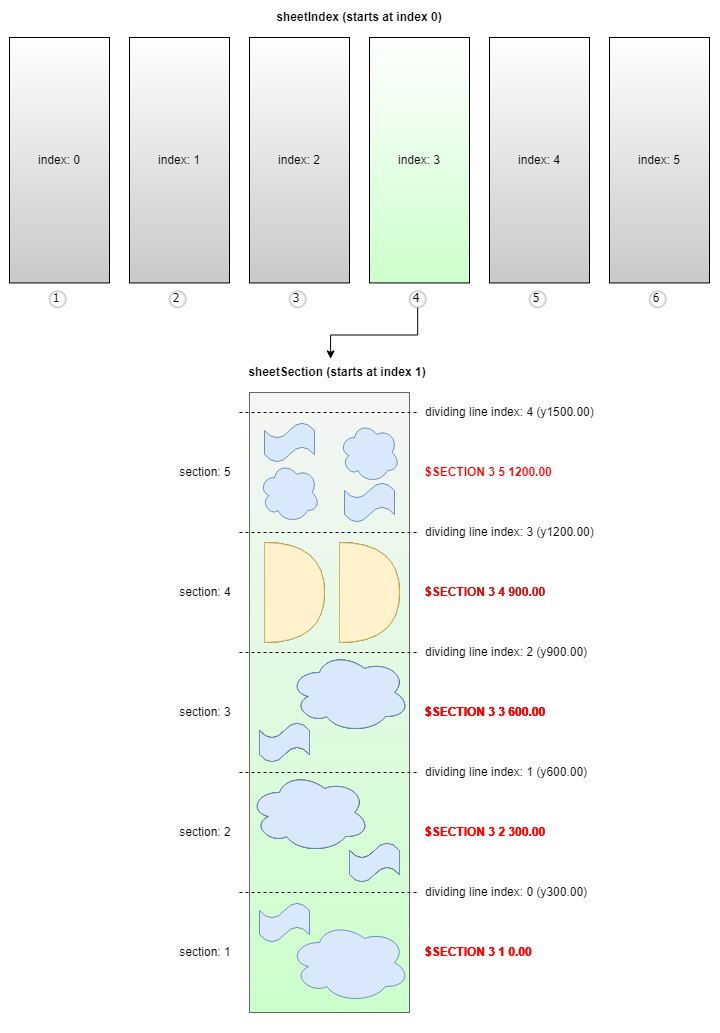
ISheetSectionInfo(details see drawing below)
sheetIndexnow starts from index 0 (before from index 1)
details see (ISheetSectionInfo.sheetIndex)sectionNumbernow starts from index 1 (before from index 0)
details see (ISheetSectionInfo.sectionNumber)
License
Copyright (c) 2023 MABI AG